The short answer. When an AI app falls over at peak time, the cause is usually not the AI. It is one of five ordinary engineering problems: hitting a provider's rate or spend limit, no queue, missing timeouts, retries that multiply the load, or your own server running out of memory or workers. Google's engineers call the usual result a cascading failure, and say the most common cause is overload.
What you get here. A 30-minute way to find which one it is, then fixes in order of effort. Every technical claim is from a primary source we read, listed at the end.
Sourced means we read the original. Our estimate marks our own judgement from building and fixing systems.
First, read the error. It tells you most of the story
Look at the status codes in your logs from the failing period.
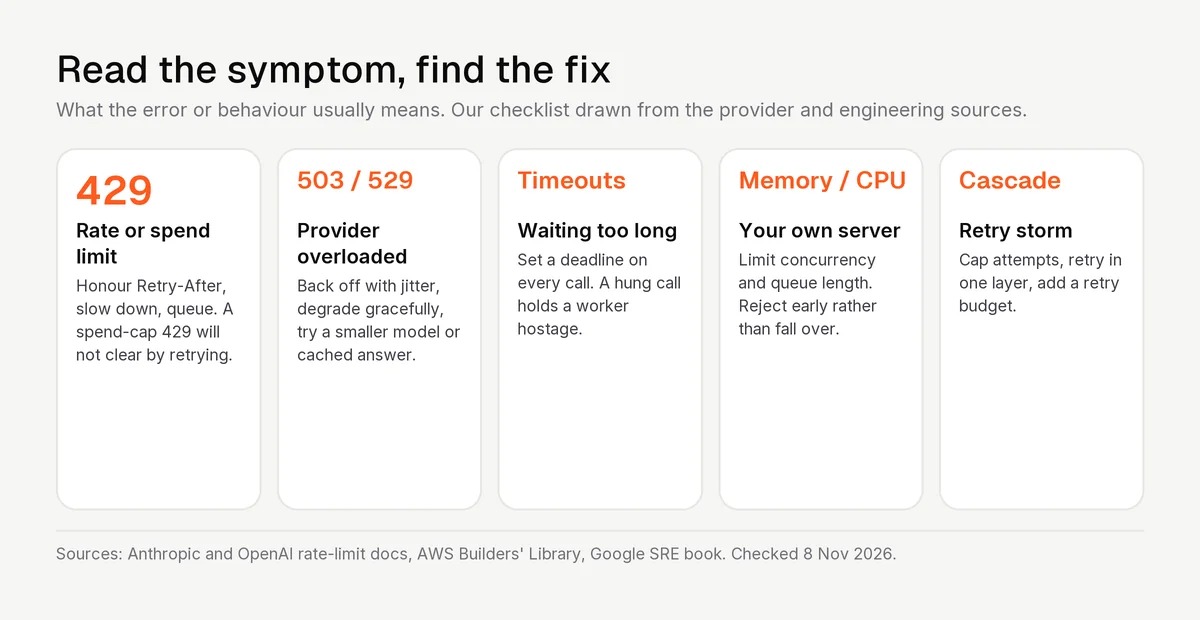
- 429. Both Anthropic and OpenAI use this for a rate limit. Anthropic's documentation says limits are measured in requests, input tokens and output tokens per minute, and that short bursts can trip them: a limit of 60 requests a minute can be enforced as 1 request a second. A 429 can also mean you hit a monthly spend cap, in which case, Anthropic notes, there is no retry-after header and retrying fails until access resumes. Sourced
- 529 (Anthropic) or 503 (OpenAI). The provider is overloaded. Anthropic says this can happen when traffic is high across all users, not just you. Sourced
- 500. A server error. Anthropic's advice is to retry with exponential backoff. Sourced
- No error, just slow and then dead. That points at your own server: threads, memory or a hung dependency.
The 30-minute check
- Minute 0 to 5: pick the time window when users complained, and count errors by status code in that window.
- Minute 5 to 10: look at the provider's response headers if you log them. Anthropic and OpenAI both return rate-limit headers showing your limit, what remains and when it resets, and a Retry-After value on many 429s. If the remaining count was near zero, you were throttled. Sourced
- Minute 10 to 15: check how many requests your own app had in flight and how long each waited. A pile of long-waiting requests means no timeout and no queue.
- Minute 15 to 20: check your server's memory and worker use. Google describes resource exhaustion, including memory pressure and running out of threads, as a classic cause of a failure that spreads.
- Minute 20 to 25: count retries. Is the same user action retried in the browser, the API gateway and your code? Retries stack.
- Minute 25 to 30: write down the one cause that explains most of the failed requests. Fix that first. Do not fix five things at once.
Cause 1: You hit the provider's limit
Fixes, cheapest first. Sourced
- Honour Retry-After. OpenAI says to treat the value as a minimum and add a small random delay. If it is missing, use exponential backoff with jitter, and limit both the number of attempts and the total time.
- Do not retry quota or billing errors. OpenAI says so, and Anthropic's spend-cap 429 will not clear by retrying. Alert a human instead.
- Ramp traffic up gradually. Anthropic warns about acceleration limits, and OpenAI says that past 1 million input tokens a minute you should increase no more than 50% every 15 minutes.
- Set max tokens close to the answer you expect. OpenAI notes its estimate uses the larger of your max_tokens and the input-based estimate, so an oversized value wastes your quota.
- Batch what is not urgent. Both providers offer batch interfaces for work that can wait.
- Raise your tier or limit once you know you need it.
Cause 2: No queue between users and the AI
If every user click calls the AI directly, a spike goes straight through to the provider and to your server. A queue turns a spike into a line. Google's guidance is to keep queues small for steady traffic, for example 50% or less of the thread pool size, so the server rejects early instead of building a long wait, and to shed load by returning an HTTP 503 once more than a set number of requests are in flight. Sourced In plain words: it is better to tell some users “busy, try again in a moment” than to make everyone wait and then fail.
Cause 3: No timeouts
AWS's Builders' Library says to set a timeout on any remote call, including connection and request timeouts, and to base it on how long the dependency normally takes at the slow end, with a small allowance. Too low and you create extra retries and load; too high and you hold workers hostage. Sourced Google adds that it is usually wise to set a deadline and pass the remaining time down through each step, so work that no longer matters is cancelled. Sourced For a language model, remember answers can take a long time. Anthropic says to use streaming or its batch interface for requests longer than 10 minutes.
Cause 4: Retries that make it worse
AWS describes retries as “selfish”: helpful for a brief hiccup, harmful when a service is already overloaded. The big danger is retrying at several layers. Google's example is four attempts at each of three layers, which turns one request into 64 calls to the bottom service. AWS gives a worked example of retrying at every layer of a five-layer stack multiplying load 243 times. Sourced
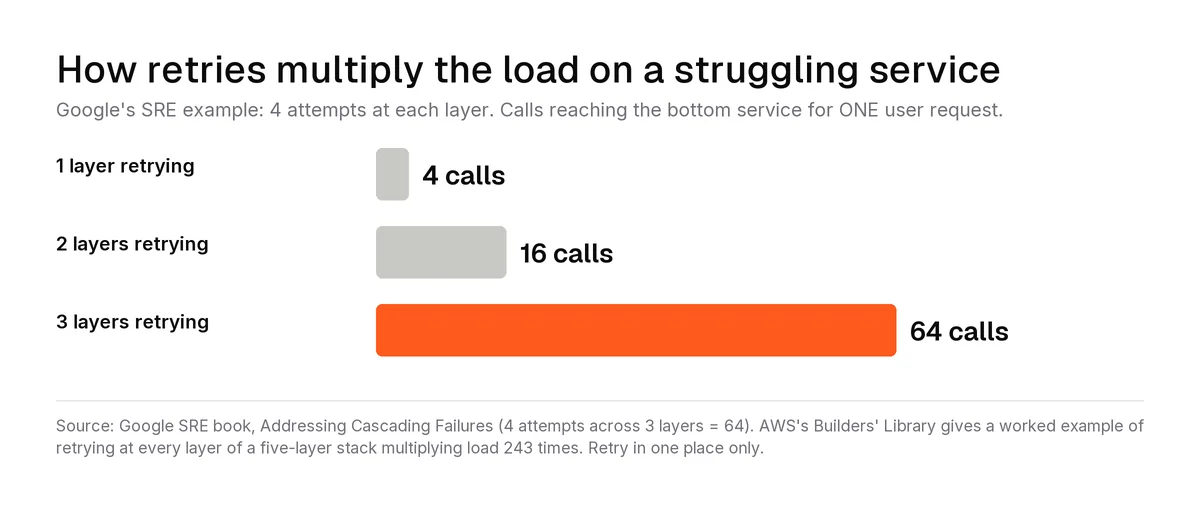
The fixes are well established: retry in one place in the stack; use randomized exponential backoff with jitter (a random delay so clients do not retry in sync); cap the attempts; and add a retry budget, such as Google's example of allowing only 60 retries a minute in a process. If the call has side effects, such as charging a card or sending a message, make it idempotent first, so a retry cannot do it twice. Note that Anthropic's SDK retries connection errors, 429s and 5xx errors twice by default, so if you also retry in your own code you may be doubling up; OpenAI says to disable SDK retries if you nest them. Sourced
Cause 5: Your own server runs out
Google lists CPU, memory, threads and file descriptors as the resources that run out, and describes a “garbage collection death spiral” where memory pressure makes everything slower, which backs up more work, which uses more memory. Sourced Practical fixes: cap concurrent AI calls per server; cap queue length; set memory limits and alert before they are hit; and run a load test before launch. Google names capacity planning and load testing as the main prevention steps. Sourced
Degrade gracefully
Google also recommends serving degraded results by doing less work: a cached answer, a shorter answer or a smaller model, rather than an error page. Sourced For an AI feature that might mean showing the last good answer, a plain search result, or a message that the assistant is busy, while still letting the user finish their task.
A before-launch checklist
- Every external call has a timeout.
- Retries happen in one layer, with backoff, jitter, a cap and a budget.
- 429, 503 and 529 are handled differently from each other, and spend-cap errors alert a human.
- A queue and a concurrency cap sit in front of the AI calls.
- Memory and worker limits are set and alerted on.
- You have load-tested at about twice your expected peak.
- There is a degraded mode for when the AI is slow or down.
- Costs are capped and monitored, since McKinsey's 2026 survey found about one in five organisations limiting AI use because of operating costs.
The cost point is sourced from the McKinsey State of AI 2026 survey. Sourced
How Proscale360 is changing this
Proscale360 is a founder-led, remote-first studio: Alif Vasaya, a marketer in Sydney, and Sabina Ansari, a senior full-stack engineer and tech lead in Ahmedabad.
We want to be the go-to contact for any IT work, priced as clearly as a supermarket shelf. We take the risks. You get the result.
If your AI app is unstable, give us one task: “make this stable under load”. Give us one task and review the working result. If you are happy, you pay. If you are not, you pay nothing. If you like it and want it better, you pay for our effort plus $10 for a round of tweaks and one meeting. The pilot page has the terms. Founder account Between them, our founders have built integrated systems from scratch to live, including project management, ServiceNow, AI integration, and data collection and analysis, and Sabina has eight years of experience leading software projects. That is our own statement and is not independently verified. What we can show you is counted: see the ProteinPlus and Juhapura Mart case studies.
If you are earlier on, where to start with AI and our AI agent development page show how we scope and build. For the cost side, try the AI project cost calculator, and send us the details for a written plan.
The evidence against us, and who we are not for
We are new and founder-led. There are two of us, so capacity has a ceiling, and we have two published case studies, ProteinPlus and Juhapura Mart. We are not the right choice if you need someone in your office five days a week, a 24-hour support team, or a large programme with many specialists at once.
If you run a high-traffic platform that needs a dedicated on-call team around the clock, you need one in-house or from a larger provider.
Frequently asked questions
Why does my AI app crash when many people use it?
Usually one of five things: you hit the provider's rate or spend limit, there is no queue, calls have no timeouts, retries multiply the load, or your own server runs out of memory or workers. Google's engineers say the most common cause of a cascading failure is overload.
What do 429, 503 and 529 errors mean?
429 is a rate or spend limit on your account. 503 (OpenAI) and 529 (Anthropic) mean the provider is overloaded. A spend-cap 429 has no retry-after header and retrying will not clear it until access resumes.
How should I retry failed AI calls?
Retry in one place only, with randomized exponential backoff, a cap on attempts and a retry budget. Honour the Retry-After header as a minimum. Do not retry quota or billing errors. Make calls with side effects idempotent.
Why do retries make an outage worse?
Because they add load to a service that is already struggling, and retrying at several layers multiplies it. In Google's example, four attempts at each of three layers turns one request into 64.
How do I load test an AI feature?
Simulate about twice your expected peak, with realistic prompts, and watch error codes, queue length, memory and response times. Test with the provider's limits in mind, and ramp up gradually.
Can Proscale360 fix my unstable AI app?
Give us one task, such as making it stable under load. If you are happy with the working result, you pay; if not, you pay nothing; if you like it and want it better, you pay our effort plus $10 for tweaks and one meeting.
Sources
- Google SRE book, Addressing Cascading Failures, accessed 8 November 2026
- AWS Builders' Library, Timeouts, retries and backoff with jitter (Marc Brooker), published 5 December 2019; accessed 8 November 2026
- Anthropic, API rate limits, accessed 8 November 2026
- Anthropic, API errors, accessed 8 November 2026
- OpenAI, Rate limits guide, accessed 8 November 2026
- McKinsey, The state of AI in 2026, 25 August 2026
General technical information, not a guarantee for your system. Provider limits and error behaviour change; check the current documentation. Prepared by the Proscale360 team with AI assistance. Checked 8 November 2026.
We specialise in exactly this kind of project. Get a free consultation and a fixed quote.