The short answer. Five Australian providers that publish prices charge roughly $99 to $185 per user a month (excluding GST) for an entry-level managed plan, with Microsoft 365 licences usually extra. For a 10-person business that is about $1,000 to $1,800 a month in our arithmetic from their own price lists. What you actually need first is short: the Australian Cyber Security Centre's four key actions for small business are multi-factor authentication, updates, tested backups and staff training. Pay for the extras only when you can say what they protect.
Who this is for. A business owner with roughly 5 to 50 staff who has no IT person and is deciding what to pay for.
Sourced means we read the original on 11 November 2026. Our arithmetic is our own sum. Our estimate is our judgement. Prices change and scopes differ, so use these as a guide, not a quote.
What IT support for a small business actually means
There are three common arrangements. TechTarget describes break-fix as services provided only when needed, typically after something breaks, paid by the job or the hour, with no response time promised and a risk of prolonged downtime. Managed services are continuous monitoring, maintenance and support under a service level agreement, usually for a monthly subscription, priced per user, per device or all-inclusive. Co-managed means a provider works alongside your own IT staff and you keep control of the rest. Sourced
Our reading: co-managed is usually described for firms that already have IT staff, so a business of 5 to 20 people with nobody in IT usually chooses between break-fix and fully managed. Our estimate These definitions come from US trade media dated 2021 to 2025 and contain no Australian prices.
What five providers publish
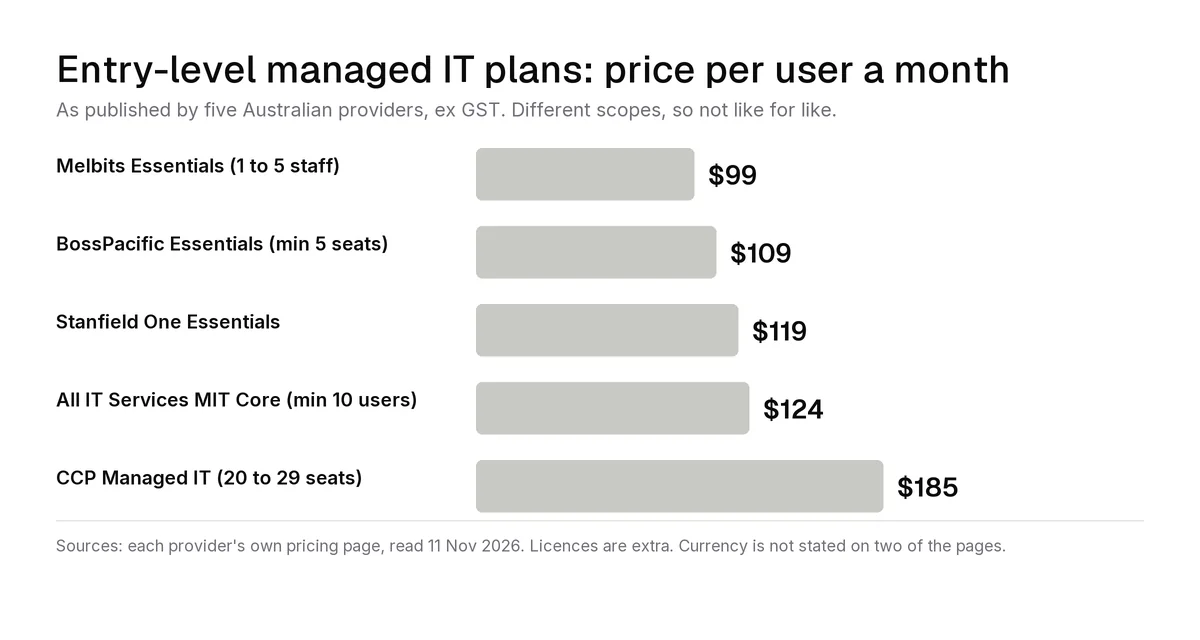
| Provider | Entry managed plan | Higher tiers | What the page says about terms and extras |
|---|---|---|---|
| Melbits (Melbourne) | Essentials from $99 per user a month, for 1 to 5 staff | Business from $180 (5 to 200 staff), adds extended-hours helpdesk, 24/7 monitoring and SLAs | Excludes GST. Says no lock-in contracts. The page's own table is inconsistent about what Essentials includes. |
| All IT Services | IT Essentials $60 per user a month plus $210 an hour for support (no helpdesk, no SLA) | MIT Core from $124 (minimum 10 users). MIT Premium from $199 (minimum 25 users) | Excludes GST. Licences and security tools passed through at cost; the page's estimator assumes about $60 per user for a typical stack. No lock-in; 30 days' notice. |
| Stanfield IT | One Essentials $119 per person a month | One Maintain (co-managed) $85. One Complete $179. One Unlimited plus AI $264 | AUD, ex GST, indicative. Minimum monthly service level $1,190. Licences, hardware and projects extra. |
| BossPacific | Essentials $109 per seat a month (minimum 5 seats) | Professional $149. Enterprise $199 | AUD, ex GST. Discounts at 20 or more seats. Term not stated. |
| CCP (Perth) | Managed IT $185 per seat a month at 20 to 29 seats (minimum 10 seats) | Plus Services $230. Plus Compliance $310. Complete $365 | AUD, ex GST. Three-year agreement; month to month on request at a higher rate. Microsoft 365 licences billed separately. |
What the range shows. From $60 per user for a help-light plan with hourly charges, to $365 for a complete service, excluding GST. Entry managed plans sit around $99 to $124, mid tiers around $149 to $185. Only CCP states a multi-year term; most say no lock-in or are silent. Several set minimums: Stanfield's is $1,190 a month, BossPacific's is 5 seats, All IT's is 10 or 25 users and CCP's is 10 seats. Sourced
A sum for a 10-person business
Our arithmetic Using each provider's own list price for the tier that fits 10 staff, ex GST:
- BossPacific Essentials: 10 × $109 = $1,090 a month.
- Stanfield One Essentials: 10 × $119 = $1,190 a month, which equals its stated minimum.
- All IT Services MIT Core: 10 × $124 = $1,240 a month, plus licences and security tools. Its own estimator assumes about $60 per user, or about $600 a month, bringing it to roughly $1,840.
- Melbits Business: 10 × $180 = $1,800 a month, because its $99 Essentials plan is for 1 to 5 staff.
The limits. Scopes differ: some include onsite visits, 24/7 monitoring or security tools and others do not, so do not read the cheapest as the best value. Annual cost is these figures times 12. Provider blog guides that claim typical prices exist, but they are marketing, and we did not use them.
Microsoft 365 is usually on top
Microsoft's Australian page shows Business Basic at AU$10.50 per user a month with Teams (AU$8.10 without Teams), paid yearly on an annual subscription that auto-renews, excluding GST. It shows Defender for Business as an add-on at AU$4.50. Standard and Premium appeared on that page only as bundles with Copilot (AU$35.20 and AU$47.90 per user a month with Teams), so we cannot give plain list prices for them. Sourced The limit: the page was undated, promotional prices apply to some add-ons, and Microsoft may change prices.
What you need first
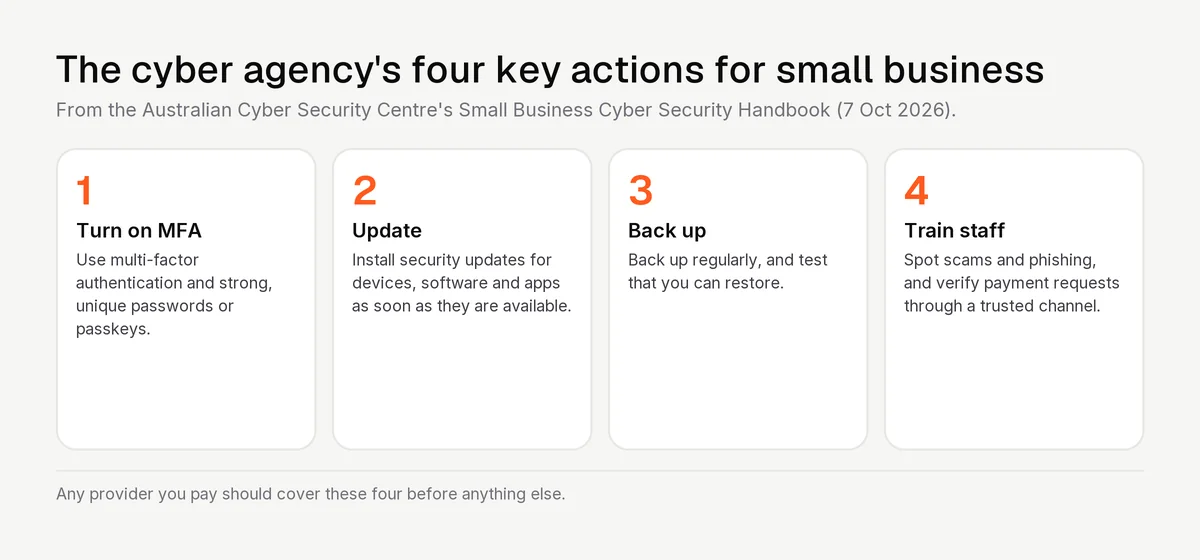
The Australian Cyber Security Centre's handbook for small and medium business lists four key actions: turn on multi-factor authentication and use strong, unique passwords or passkeys; keep devices, software and apps up to date; back up important business and customer information regularly and test that you can restore it; and train staff to spot scams and phishing and verify payment requests through a trusted channel. It also recommends speaking to an IT professional or trusted adviser with questions. Sourced
Why it matters. The Australian Signals Directorate's 2024 to 2025 report says its cybercrime reporting line received over 84,700 reports, about one every 6 minutes. The average self-reported cost per report for a small business was $56,600, up 14%. For businesses overall, the most commonly self-reported cybercrimes were email compromise with no financial loss (19%), business email compromise fraud with financial loss (15%) and identity fraud (11%). Sourced The limits: these are self-reported averages, not a census, and ASD says the vast majority of cybercrime goes unreported.
What to pay for, and what to question
Our estimate This is our judgement, not a published rule.
| Usually worth paying for | Ask what it protects before you pay |
|---|---|
| Multi-factor authentication set up and enforced for everyone | 24/7 monitoring, if your people work business hours and nothing runs overnight |
| Automatic updates and patching for devices and Microsoft 365 | Quarterly strategy reviews, if nobody acts on them |
| Backups that are monitored and test-restored | Onsite visits, if you are rarely in the same room |
| A helpdesk that answers during your working hours, with a stated response time | Premium tiers and add-ons you cannot describe in a sentence |
| A named admin account that you control and a written offboarding process | Long minimum terms with no clear exit |
A note on Essential Eight
Some providers advertise alignment with the Essential Eight, the government's set of baseline cyber security strategies. The maturity model FAQ says maturity level one may be suitable for small to medium enterprises. But in October 2026 the Australian Signals Directorate published an FAQ saying it is moving to a new series of guidance and explaining why it is replacing the Essential Eight, with phased priorities instead of maturity levels, written primarily for government, critical infrastructure and large organisations, while publishing tailored guidance for small businesses. Sourced What this means for you: do not pay a premium for Essential Eight compliance as such. The small business handbook above is the guidance written for you. ASD says it will advise on the transition in due course.
Questions to ask any provider
The Australian Cyber Security Centre publishes five questions for anyone engaging a managed service provider, noting that providers often have broad access to your systems, networks and data:
- Are you implementing better practice cyber security?
- Are you securely administering your systems and services?
- Are you monitoring activity on your systems and services?
- Are you regularly assessing your systems and services?
- Are you prepared for, and able to respond to, cyber security incidents?
We would add these commercial questions. Our estimate They are ours, not a published list. What is excluded, and what costs extra? How long is the term, and what does leaving cost? Who owns the administrator accounts and the documentation? What is the response time for a critical problem, in writing? What happens after hours? How is an employee who leaves removed from every system?
How Proscale360 is changing this
Proscale360 is a founder-led, remote-first studio: Alif Vasaya, a marketer in Sydney, and Sabina Ansari, a senior full-stack engineer and tech lead in Ahmedabad.
We want to be the go-to contact for any IT work, priced as clearly as a supermarket shelf. We take the risks. You get the result.
Founder account Between them, our founders have built integrated systems from scratch to live, including project management, ServiceNow, AI integration, and data collection and analysis, and Sabina has eight years of experience leading software projects. That is our own statement and is not independently verified. What we can show you is counted: see the ProteinPlus and Juhapura Mart case studies.
We are not a local IT provider and we do not visit your office. We supply and manage IT staff, such as help desk, systems, DevOps and QA, with named owners, written runbooks and tight access controls, and we start with a trial. See IT staffing and managed IT teams. Give us one task and review the working result. If you are happy, you pay. If you are not, you pay nothing. If you like it and want it better, you pay for our effort plus $10 for a round of tweaks and one meeting. The pilot page has the terms.
The evidence against us, and who we are not for
We are new and founder-led. There are two of us, so capacity has a ceiling, and we have two published case studies, ProteinPlus and Juhapura Mart. We are not the right choice if you need someone in your office five days a week, a 24-hour support team, or a large programme with many specialists at once.
If you have a small office, want a person to turn up when the printer or network fails, and have no IT staff, a local provider with onsite support is usually a better fit than us. We are a better fit if you run an IT firm or a larger team and want extra managed capacity. Read our honest guide to alternatives for the wider picture.
Frequently asked questions
How much does IT support cost for a small business in Australia?
Five Australian providers that publish prices charge roughly $99 to $185 per user a month, excluding GST, for an entry-level managed plan, with tiers from $60 to $365 across their ranges. For 10 staff that is about $1,000 to $1,800 a month at entry tiers, in our arithmetic from their list prices. Licences are usually extra, and scopes differ.
What is the difference between break-fix and managed IT?
Break-fix means you pay when something breaks, by the job or hour, with no promised response time. Managed IT is continuous monitoring, maintenance and support under a service level agreement for a regular fee. Co-managed means a provider works alongside your own IT staff.
How much does Microsoft 365 cost for a small business in Australia?
Microsoft's Australian page shows Business Basic at AU$10.50 per user a month with Teams (AU$8.10 without), paid yearly, excluding GST. Standard and Premium appeared only as Copilot bundles on that page, so check the current price for the plan you need.
What cyber security does a small business need first?
The Australian Cyber Security Centre's small business handbook lists four key actions: turn on multi-factor authentication, keep software and devices updated, back up regularly and test restores, and train staff to spot scams and phishing.
Do I need the Essential Eight?
Not as a purchase. The maturity model FAQ said level one may suit small to medium enterprises, but in October 2026 ASD published an FAQ on replacing the Essential Eight with a new series aimed primarily at large organisations and government, while publishing tailored guidance for small businesses. The small business handbook is written for you.
What should I ask an IT provider?
Start with the ACSC's five questions on better practice security, secure administration, monitoring, regular assessment and incident response. Add commercial questions on what is excluded, the term and exit, who owns the admin accounts, response times, and after-hours cover.
Can Proscale360 provide IT support for my small business?
We supply and manage IT staff remotely, rather than visiting your office. For a small office that wants someone onsite, a local provider is usually a better fit. We suit IT firms and larger teams that want extra capacity.
Sources
- Melbits: Pricing, undated; read 11 November 2026
- All IT Services: Pricing, undated; read 11 November 2026
- Stanfield IT: Stanfield One, undated; read 11 November 2026
- BossPacific: Pricing, undated; read 11 November 2026
- CCP: Pricing, undated; read 11 November 2026
- Microsoft Australia: Microsoft 365 plans and pricing, undated; read 11 November 2026
- ACSC: Small Business Cyber Security Handbook, published and reviewed 7 October 2026
- ASD: Annual Cyber Threat Report 2024 to 2025, published 14 October 2025
- ACSC: Questions to ask managed service providers, reviewed 24 March 2023
- ACSC: Essential Eight maturity model FAQ, published 16 July 2021
- ASD: Essentials frequently asked questions, 15 October 2026
- TechTarget: What is break/fix?, 24 July 2025
- TechTarget: Managed IT service, 6 October 2021
- TechTarget: Co-managed IT support sees demand in the remote work era, 27 April 2021
- Proscale360 price list, our own published prices, US dollars
General information, not advice. Prices and scopes change, and we read each page once on 11 November 2026. We did not use providers' blog price guides. Prepared by the Proscale360 team with AI assistance.
We specialise in exactly this kind of project. Get a free consultation and a fixed quote.